Integrations
preview · OAuth wiring imminentQuickBooks, Xero, Sage — same five rules, same digest.
Every supported ledger is connected through a scoped, post-only OAuth — never raw admin, never a shared password. PODetect reads the chart of accounts and the recent GL, drafts the AP batch, and only posts what passes the same five-rule audit that powers the daily digest. Below is the per-vendor preview: what the owner still has to do, what PODetect reads and writes, and what triggers a post.
- Post-only OAuth
- 4 scopes
- Audit checks
- 5 / 5
- Reversal window
- 30 days
- Ledger batches
- draft / post
Connection · Online · US/CA/UK
QuickBooks Online
Post a clean invoice batch to QuickBooks Online with a scoped, post-only OAuth connection — no raw admin access, no read-back outside the invoice lines you asked us to score.
prerequisites
- A finance user with Admin permissions on the QBO company file.
- A one-time owner OAuth: only the controller signs in. PODetect stores a refresh token, never a password.
- A chart-of-accounts mapping file — PODetect reads the existing codes, never overwrites them.
reads · writes
reads
- Vendor master — names, remit-to addresses, and 1099 flags.
- Chart of accounts context — read-only scope, used to map GL codes.
- Recent GL account balances — to surface dimension drift before posting.
writes
- AP journal entries — debit expense account, credit Accounts Payable.
- Optional class / project tags, on the cost-center PODetect routes to.
- A 30-day reversal trail — every post is reproducible from the audit log.
triggers
- PO + audit pass — invoice reconciled to the open PO and all five checks green.
- Recurring-vendor audit pass — same vendor, same tolerance band, no new remit-to.
- Manual bulk reclass — controller approves a previously-failed batch from /exceptions.
QuickBooks Online · preview
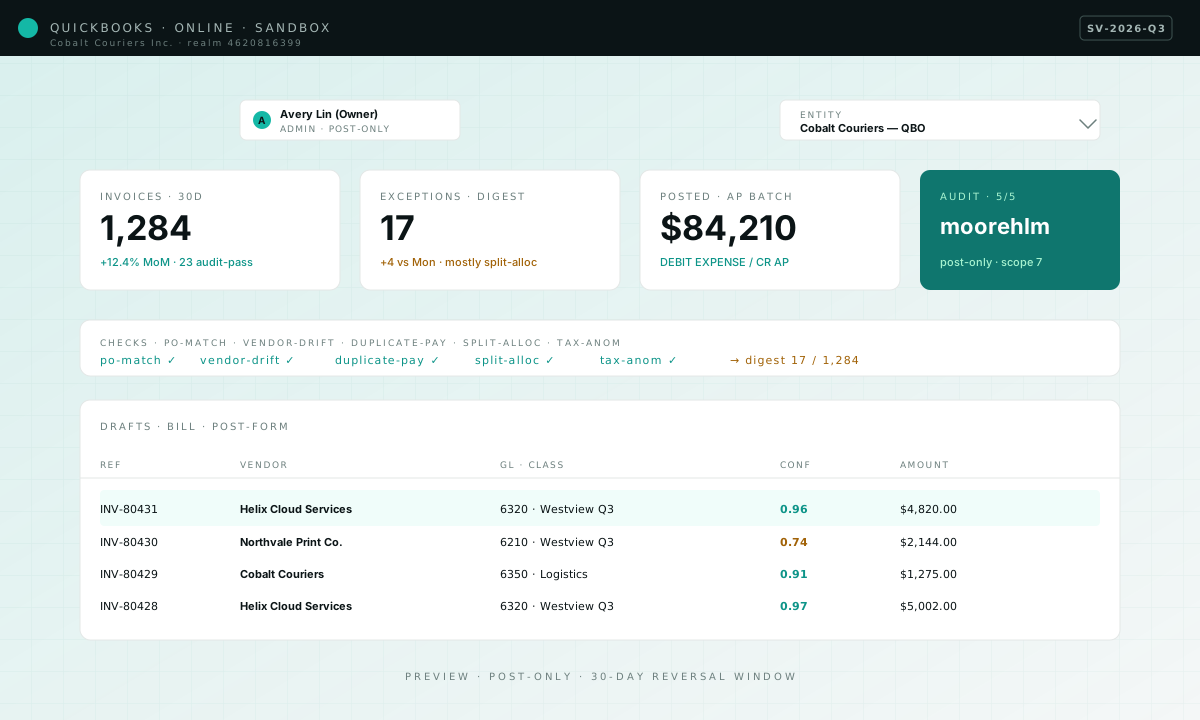
Owner badge
PODetect only accepts the OAuth from a user with Admin permissions.
Company selector
Multi-entity tenants pick which QBO realm the audit pipes into.
Post-form row
Each row is a draft journal entry: GL code, class, vendor, and a confidence stamp.
connection flow
From click-to-connect to a draft AP batch
PODetect only posts once three things happen, in order: a scoped OAuth initiated from PODetect, an admin or Standard+ approver on the ledger side, and a chart-of-accounts / dimension mapping the controller confirmed. Every step below is preview-only — the live UI ships when the per-vendor settings panes are wired.
Step 1 / 3
Initiate OAuth from PODetect
Click Connect QuickBooks on /dashboard/settings; we redirect to the vendor’s consent screen with a scoped, post-only scope set. No raw admin scope, and no password ever leaves your browser.
Step 1 · QuickBooks Online
placeholderSScope list
Only the four post-only scopes PODetect requests — no raw admin, no read-back beyond what the audit needs.
RReturn URL
PODetect names the redirect target literally so the owner sees exactly where the token will land.
Consent screen · Cobalt Couriers sandbox · placeholder screenshot, real artwork to follow. Step 2 / 3
Admin grants access
A user with Admin permissions on the QBO company file signs in and approves the requested scopes. PODetect stores the refresh token, never the password, and never the customer’s admin session.
Step 2 · QuickBooks Online
placeholderAAdmin badge
The consent flow requires the Admin role on the company file; non-admins see an explicit refusal.
RRealm selector
Multi-entity tenants pick which QBO realm this OAuth grants PODetect access to.
QBO admin sign-in · realm 4620816399 · placeholder screenshot, real artwork to follow. Step 3 / 3
Map the chart of accounts
The controller reviews the read-only mapping PODetect generated from the existing chart of accounts, then confirms or edits the class / project splits. Once saved, the first AP batch drafts into the in-app review pane.
Step 3 · QuickBooks Online
placeholderMMapping row
Each row is a QBO GL code on the left, a PODetect cost-center on the right — edit inline, save once.
SSave mapping
Saving commits the mapping; PODetect only posts journal entries under codes the controller confirmed here.
Mapping review · 7 GL codes · Cobalt Couriers · placeholder screenshot, real artwork to follow.
Wire it up
Once the per-vendor settings pane under /dashboard/settings ships, owners will start the scoped OAuth from here — not from a pop-up, not via a hand-shared link. Today the route below resolves to a 404 by design; this surface is the preview for that flow.
Connect QuickBooksConnection · AU/NZ/UK · org-scoped
Xero
A tenant-scoped Xero connection — PODetect drafts the same AP journal entry shape as QBO, with the org-level tracking categories intact for multi-practice engagements.
prerequisites
- A user with Standard+ permissions on the Xero org.
- A one-time owner OAuth — PODetect stores the access token, scoped to the org.
- Tracking categories mapped at the org level — classes are first-class here.
reads · writes
reads
- Contacts + bank-account list — the same remit-to drift detection runs against Xero contacts.
- Chart of accounts + tracking categories — dimensions and codes both.
- Draft invoices — PODetect reads them to confirm the audit pool before posting the AP batch.
writes
- AP-authorised bill entries — the authorise-on-create model Xero ships with.
- Tracking-category tags for cost-center / engagement — set per line, not per entry.
- Manual reversal notes — appended as a draft history event, never as a destructive edit.
triggers
- PO + audit pass — invoice reconciled to the open PO and all five checks green.
- Recurring-vendor audit pass — same vendor, same tolerance band, no new remit-to.
- Multi-currency lock — bills denominated in a non-base currency pause until the audit hits a 0.95+ confidence.
Xero · preview
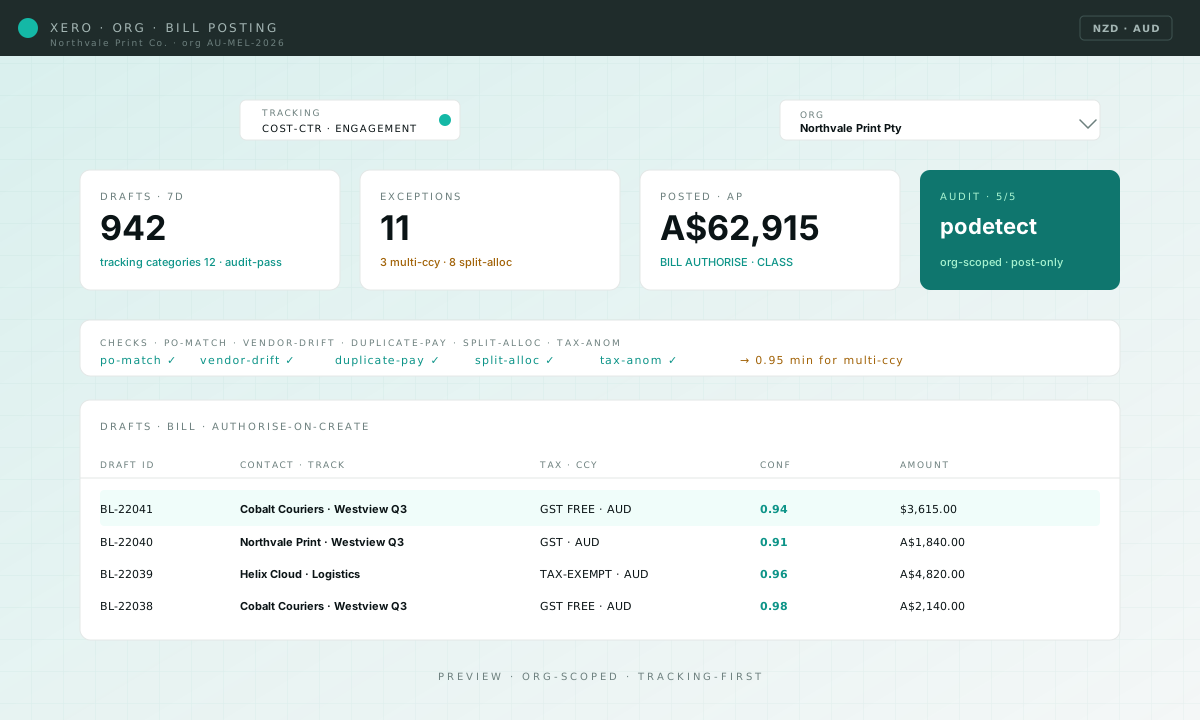
Tracking categories
Cost-center + engagement tags route per line item, not per batch.
Org selector
Multi-org tenants pick which practice this audit pipe drives.
Bill row
Each row is a draft bill with tax, class, and a confidence stamp on every line.
connection flow
From click-to-connect to a draft AP batch
PODetect only posts once three things happen, in order: a scoped OAuth initiated from PODetect, an admin or Standard+ approver on the ledger side, and a chart-of-accounts / dimension mapping the controller confirmed. Every step below is preview-only — the live UI ships when the per-vendor settings panes are wired.
Step 1 / 3
Initiate OAuth from PODetect
Click Connect Xero on /dashboard/settings; we redirect to Xero’s org-scoped consent screen with the four scopes the audit needs. No password leaves the browser; the token stays org-scoped, not global.
Step 1 · Xero
placeholderSScope list
Org-scoped scopes only — PODetect never requests the global Xero tenant token.
RReturn URL
Owner-visible redirect url labelled with the org name — no surprise callback domain.
Consent screen · Northwind Practice AU · placeholder screenshot, real artwork to follow. Step 2 / 3
Standard+ user grants access
A user with Standard or higher permissions on the Xero org signs in and approves. PODetect stores an org-scoped access token; no admin password is ever seen by us, and no other org is touched.
Step 2 · Xero
placeholderSStandard+ badge
PODetect refuses the OAuth if the granter is below Standard — the audit needs read+write on bills.
OOrg selector
Multi-org practices pick which org the audit pipe drives; tokens stay isolated per org.
Xero sign-in · org_6f9b2c · placeholder screenshot, real artwork to follow. Step 3 / 3
Map tracking categories
Owner reviews the tracking-category mapping PODetect built from the org’s published categories — cost-center, engagement, region — and edits any line that needs to roll up differently. Saving the mapping unlocks the first AP batch.
Step 3 · Xero
placeholderCCategory row
Each row couples a Xero tracking category to a PODetect cost-center; edits propagate to every AP batch.
SSave mapping
Saving commits the mapping; the audit pool now includes bills routed under these categories.
Mapping review · 3 tracking categories · Northwind · placeholder screenshot, real artwork to follow.
Wire it up
Once the per-vendor settings pane under /dashboard/settings ships, owners will start the scoped OAuth from here — not from a pop-up, not via a hand-shared link. Today the route below resolves to a 404 by design; this surface is the preview for that flow.
Connect XeroConnection · Mid-market · multi-entity
Sage Intacct
A multi-entity Sage Intacct connection — PODetect routes the AP batch at the entity level, with class, department, and project dimensions all carried into the same journal entry.
prerequisites
- A user with AP Clerk + permissions on the relevant entity.
- A one-time owner OAuth — the pack connects at the entity layer, not the org top.
- Dimensions pre-published for class, department, project — PODetect reads the metadata first.
reads · writes
reads
- Vendor master + remit-to — illustrates the same drift detection as QBO/Xero.
- Dimensions + the active chart of accounts — dimensional posting honours the chart published in Intacct.
- Recent GL activity — used to surface stale vs duplicate entries on the same GL.
writes
- AP bill records — with class, department, and project tags carried from the audit context.
- Custom-allocation splits — PODetect can post split allocations across projects at the audit layer.
- Reversal entries — drafted in a separate period so finance can review them 1:1.
triggers
- PO + audit pass — invoice reconciled to the open PO and all five checks green.
- Audit pass on a recurring vendor — same vendor, same tolerance band, no new remit-to.
- Manual bulk reclass — controller approves a previously-failed batch from /exceptions.
Sage Intacct · preview
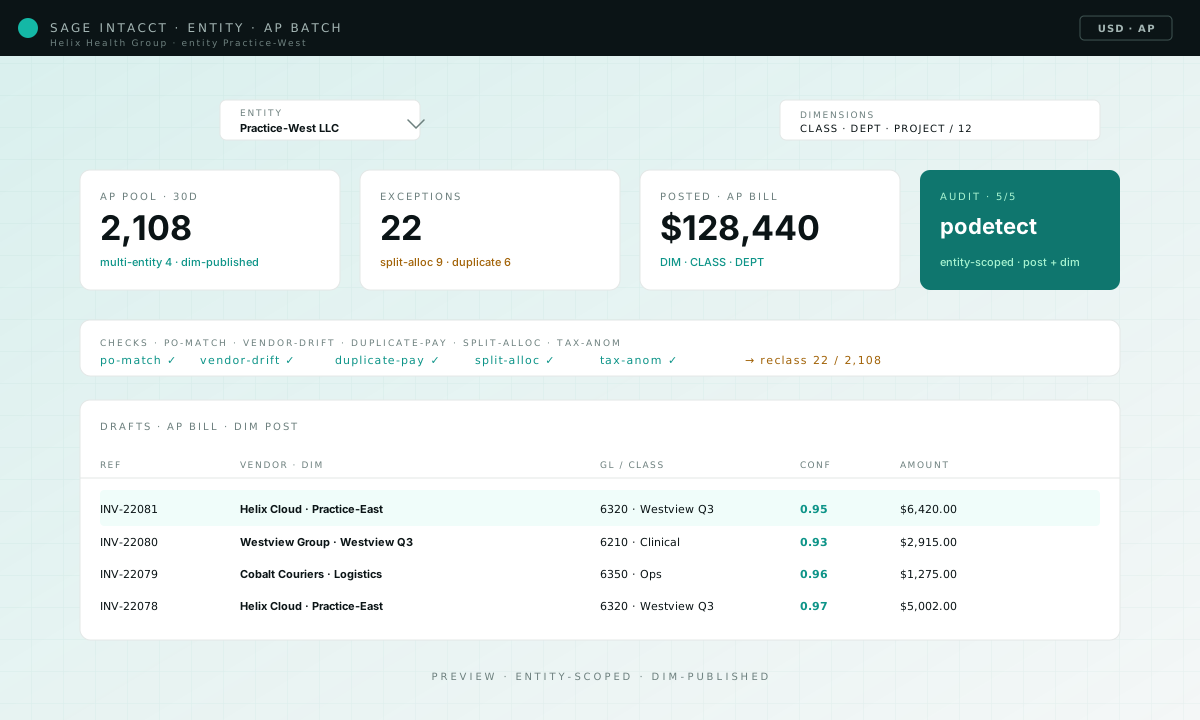
Entity picker
Multi-entity tenants pick which Intacct entity the audit pipe drives — same pattern as QBO.
Dimensions
Class, department, project — three dimension fields carried per line.
Post-form row
Each row is a draft AP bill with dimension tags and a confidence stamp on the audit pair.
connection flow
From click-to-connect to a draft AP batch
PODetect only posts once three things happen, in order: a scoped OAuth initiated from PODetect, an admin or Standard+ approver on the ledger side, and a chart-of-accounts / dimension mapping the controller confirmed. Every step below is preview-only — the live UI ships when the per-vendor settings panes are wired.
Step 1 / 3
Initiate OAuth from PODetect
Click Connect Sage on /dashboard/settings; we redirect to Intacct’s entity-scoped consent screen. The grant covers the AP + dimensions scopes the audit needs and nothing else.
Step 1 · Sage Intacct
placeholderSScope list
Entity-scoped read+write on AP and dimensions — PODetect never requests the top-level admin pack.
RReturn URL
Redirect URL is labelled with the entity name so the owner never has to wonder where the token lands.
Consent screen · Verdant Studios entity · placeholder screenshot, real artwork to follow. Step 2 / 3
AP clerk grants access
A user with AP Clerk or higher permissions on the Intacct entity signs in and approves. PODetect stores an entity-scoped token keyed to the entity ID, never the org top.
Step 2 · Sage Intacct
placeholderAAP Clerk badge
Only AP Clerk or higher can grant — Intacct itself rejects lower roles at the consent step.
EEntity selector
Multi-entity tenants pick which entity this OAuth unlocks; rest of the org stays untouched.
Intacct sign-in · entity VERD-NA-01 · placeholder screenshot, real artwork to follow. Step 3 / 3
Map dimensions
Owner reviews the class + department + project mapping PODetect generated from the Intacct dimensions and edits any split that needs bespoke allocation. Saving unlocks the first AP batch with dimensional posting intact.
Step 3 · Sage Intacct
placeholderDDimension row
Class / department / project coupled per line; PODetect can post split allocations across projects.
SSave mapping
Saving commits the mapping; subsequent AP batches carry dimensional tags onto every journal entry.
Mapping review · 3 dimensions · Verdant VERD-NA-01 · placeholder screenshot, real artwork to follow.
Wire it up
Once the per-vendor settings pane under /dashboard/settings ships, owners will start the scoped OAuth from here — not from a pop-up, not via a hand-shared link. Today the route below resolves to a 404 by design; this surface is the preview for that flow.
Connect SageClosing line
Stop reviewing invoices. Start reviewing exceptions.
Self-serve signup, no sales call, no custom implementation — pick the tier that matches your AP volume and PODetect starts auditing the morning after. PODetect is built for 10–100 person services firms whose controllers have more invoices than hours.